Song Request Channel
Listune can create a dedicated channel in your server where members can request songs simply by typing a song name or pasting a link. This is a great way to keep music requests organized and separate from your general chat.
Setting It Up
Use the following command to create the song request channel:
/setup type:CreateListune will automatically create:
- A new category named after the bot
- A text channel called
song-requestwhere members can type song names or paste URLs - A voice channel where Listune will play the requested music
The text channel will display an interactive embed with playback control buttons, so members can manage the player without needing to type any commands.
You need the Manage Server permission to use the /setup command.
How It Works
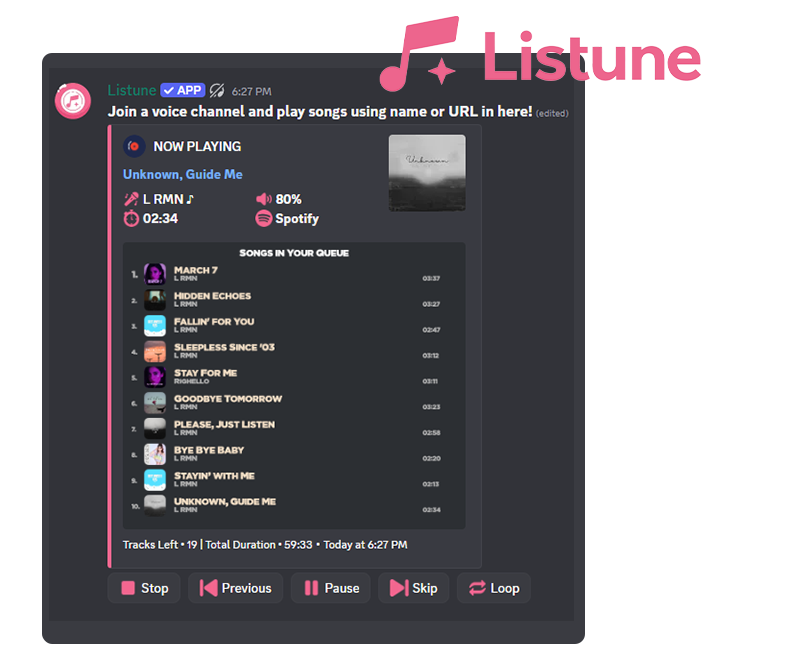
Once the channel is set up, any message sent in the song-request channel will be treated as a song request. Members can:
- Type a song name (for example,
Blinding Lights) - Paste a URL from YouTube, Spotify, SoundCloud, or any other supported platform
Listune will search for the track, add it to the queue, and begin playing if nothing is currently active.
Removing the Setup
If you no longer want the dedicated song request channel, you can remove it with:
/setup type:DeleteThis will delete the category, text channel, and voice channel that were created during setup, and disable the song request feature for your server.
Important Notes
- Only one song request channel can be active per server at a time.
- If you manually delete any of the channels created by the setup, use
/setup type:Deleteto clean up the database entry before creating a new one. - The interactive embed in the text channel includes buttons for play, pause, skip, stop, and more.